
Active customer
Payment confirmations and processing
Updated Owner: Servicing
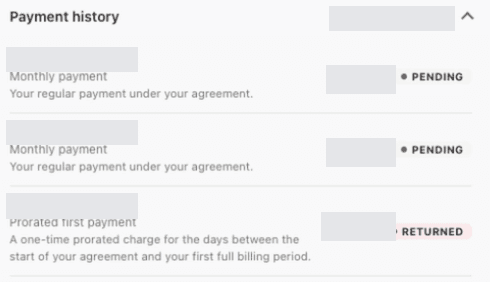
Expand Payment history in My LeasePoint to review listed transactions, descriptions, dates, amounts, and statuses. If you are unsure whether a payment went through, contact LeasePoint before repeating it.
Review a transaction
- Open My LeasePoint and confirm the correct account.
- Expand Payment history.
- Find the entry by date and review its description, amount, payment method when shown, and status.
- Look for the status beside the transaction, such as Paid, Pending, or Returned.
If the status is unclear
- Contact LeasePoint if a status is unexpected or you need to confirm the transaction and any next step.
- Include your account number and the transaction date. Keep any payment confirmation available.
- Check the account information and contact support before repeating a payment when its result is unclear.
- A submitted payment request or confirmation does not necessarily establish settlement or an updated account balance.
Example screens
These demonstration screens illustrate the workflow. Labels, fields, and availability may vary by program and production release.

Use the secure experience for your actual information
This guide is general. Your application, option, agreement, requirements, payment obligations, and account status may differ. Signed documents and secure account information control.
Need an account-specific answer?
Contact the right LeasePoint team
Choose a route without posting private application, bank, identity, or account information.