
Borrowers and personal guarantors with account access
Use your My LeasePoint account dashboard
Open My LeasePoint to review the account information and documents available to you. The dashboard can show upcoming payments, loan details, payment history, and support information. What appears depends on your account and who services it.
Before you begin
- Select Open My LeasePoint to go to your account dashboard.
- Check the account number and business name at the top to confirm you are viewing the right account.
- Contact LeasePoint if you need help accessing your account.
Review payments and loan details
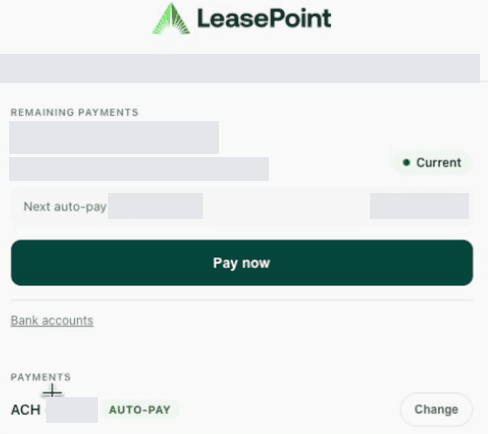
- When shown, Remaining payments and the next payment information provide an account overview.
- Expand Upcoming payments to see the listed payment dates and amounts.
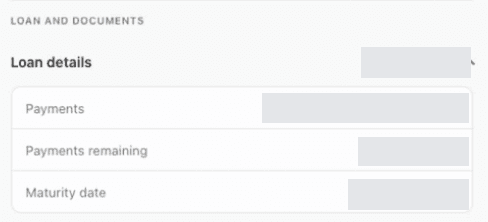
- Expand Loan details to review Payments, Payments remaining, and Maturity date. Review the full payment description because scheduled amounts may change during the term.
- If Pay now is available, select it to start the payment process and follow the instructions presented. Check the result before treating a payment as complete.
- For the exact payoff amount, expand Payoff quote and contact LeasePoint. Remaining payments is not a payoff quote.
Find documents and payment history
- Expand Documents for the available Signed agreement, Payment statement, and Year-end summary options.
- For a payment statement, set the From and To dates and select its Download button. For a year-end summary, choose a Year and select its Download button.
- Expand Payment history to review listed transactions, descriptions, amounts, and statuses such as Paid, Pending, or Returned.
If another company services your loan
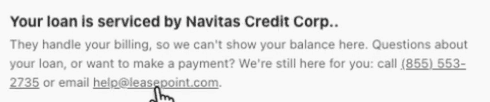
The dashboard may name an outside servicer, such as Navitas Credit Corp., and explain that your balance is not displayed because that company handles billing. Follow the notice for your account and contact LeasePoint for help with payments or loan questions.
Contact information and insurance
- Expand Contact info to review the phone number and email address on file. Email [email protected] to request an update.
- If an Insurance notice says no proof is on file, you can send proof to [email protected]. Contact LeasePoint with questions about the notice or any insurance fee it mentions.
Get account help
Email [email protected] or call (855) 553-2735. Include your account number and a short description of the issue. For a transaction question, include its date. Do not email passwords or full bank account details.
Example screens
These demonstration screens illustrate the workflow. Labels, fields, and availability may vary by program and production release.

Use the secure experience for your actual information
This guide is general. Your application, option, agreement, requirements, payment obligations, and account status may differ. Signed documents and secure account information control.
Need an account-specific answer?
Contact the right LeasePoint team
Choose a route without posting private application, bank, identity, or account information.